20/10/2026 20:42
Which Shade Is Shown? TikTok Photo Alt Text for Cambodian Lampshade Shops

A lampshade photo can look attractive while leaving essential details unexplained. Is the shade tapered or cylindrical? Does the photograph show the whole item or only its mounting ring? For a Cambodian shop promoting replacement shades, those differences help customers identify what they are asking about. This guide uses a hypothetical Phnom Penh lampshade shop to explain a practical TikTok photo alt-text workflow. The aim is to make each picture understandable, keep sales information consistent, and assess promotion sensibly. Accessibility work belongs in the content preparation process; it cannot be replaced or validated by buying engagement.
1. Start with the question each photograph should answer
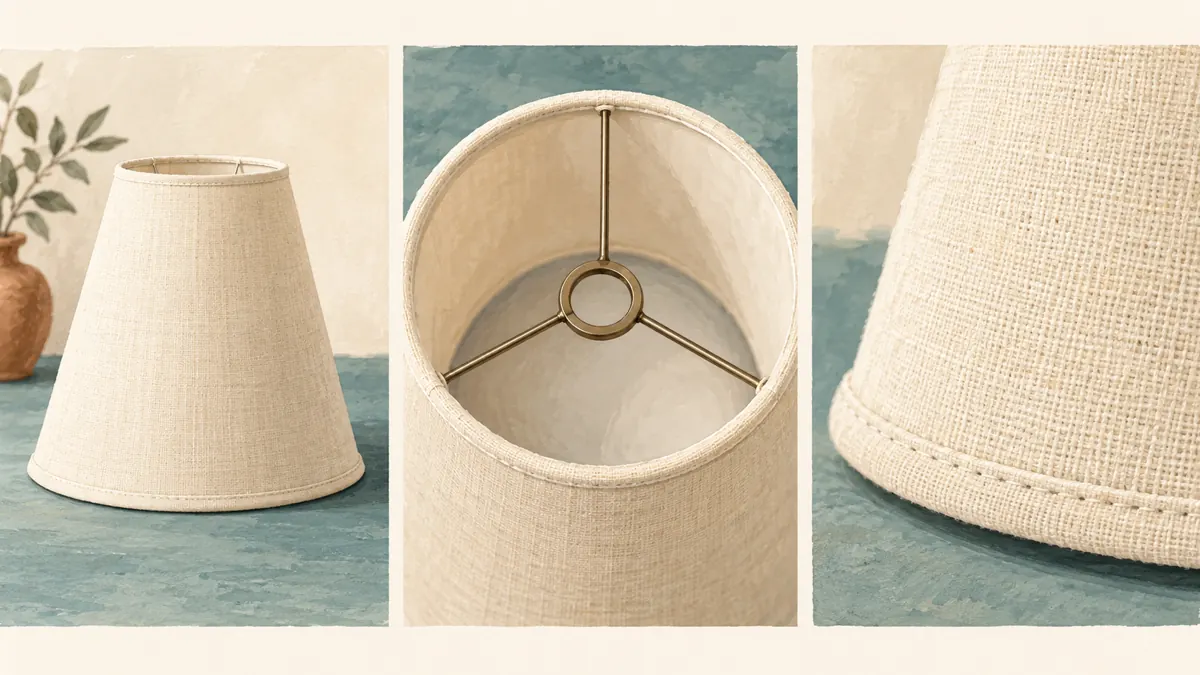
In our hypothetical shop, staff receive messages asking for “the cream one” even though several shades share that colour. The owner prepares a photo post about one tapered fabric model. Before taking pictures, the team writes three questions: What is its overall shape? What does the mounting arrangement look like? What surface detail distinguishes it? These questions give the post a purpose beyond showing attractive stock.
Choose photographs that answer those questions separately. Begin with the whole shade against a quiet background, follow with a view into the opening, and finish with a fabric detail. Keep the same physical sample throughout. A close-up from another model can introduce a contradiction that careful wording will not fix. If the mounting ring is hidden, take another photograph instead of asking the description writer to guess.
2. Give alt text and the sales caption different jobs
TikTok describes photo alt text as a way to explain images for people using screen readers, with up to 300 characters per description. Use that space for the visual information that matters. The post caption can carry the offer, product reference, availability qualification and next step. Both should agree, but copying the entire sales pitch into every image description creates needless repetition.
For example, the hypothetical shop’s caption might explain that the shade is sold separately and invite customers to ask about fitting compatibility. The first image description should identify the shade’s appearance. If a photograph includes a lamp base for display, describe that arrangement accurately and make the sale scope explicit in the caption. Do not assume that showing an assembled lamp communicates which pieces the customer receives.
3. Draft descriptions from visible evidence
Use a simple writing order: identify the object, state its distinguishing shape or arrangement, then add the important detail. A hypothetical first-image description could read: “Cream fabric lampshade with a narrow top and wider circular base, standing alone on a wooden counter.” This establishes the object without unsupported claims about quality, durability or suitability.
For the second image, try: “View into the cream shade, showing a central metal ring connected to the outer frame by three spokes.” For the third: “Close-up of the cream fabric’s woven texture and stitched trim along the lower edge.” These examples describe three different views rather than repeating a product name. Use them only when the actual photographs match.
Avoid adding “fits every lamp” or inferring material composition from appearance. A photograph may show a woven surface without proving that it is linen. Put verified specifications in the product information, and leave uncertain details out until someone checks the sample or supplier documentation.
4. Decide what belongs in the description
Ask whether a detail changes the reader’s understanding of this particular picture. The shade’s outline, visible opening, contrasting trim and position on a base can matter. A distant shelf usually does not. Describe a hand when it demonstrates scale or holds a part in a meaningful position; there is no need to catalogue every incidental object in the shop.
Treat text printed inside the photograph as information requiring review. If an image contains an essential model code or measurement, preserve its meaning in accessible wording and in the relevant product details. Do not invent a measurement from the apparent size of a hand or table. When a graphic contains too much essential text to describe concisely, simplify the graphic and move the detailed explanation into the caption.
Also distinguish observation from interpretation. “Warm yellow light visible through the shade” describes a photographed appearance. “Creates perfect lighting for every bedroom” makes a broad promise the image cannot establish.
5. Choose language around the intended reader
For a Cambodian shop, decide the post’s working language before drafting. If the offer and customer support are in Khmer, arrange a Khmer description review by someone who understands both the language and the product. An English description attached to a Khmer offer may leave an unnecessary gap. This article’s English examples demonstrate structure; they are not a reason to change the shop’s language configuration.
Build a small shared vocabulary for recurring features: tapered shade, cylindrical shade, mounting ring, upper opening and lower edge. Ask the reviewer to check whether the chosen terms make sense to ordinary customers. Keep genuine model identifiers consistent across languages. Avoid squeezing two complete translations into one description when that makes both unclear; select a deliberate language approach and test it with the intended audience.
Read the draft aloud before entering it. Long strings of abbreviations, promotional hashtags and decorative symbols often make an otherwise straightforward description harder to follow.
6. Enter the text against the final photo order
TikTok’s documented upload route is to select or create photos, continue with Next, open More options on the posting screen, and choose Add alt text. Enter the relevant description beside each photo, then select Done. For an existing photo post, its guidance directs users through the post’s More options menu, Edit post and Add alt text.
Complete the image selection and order first. Then work through the descriptions one photograph at a time, checking the thumbnail rather than relying on memory. In the hypothetical shop, the overall view comes first, the mounting view second and the fabric detail third. If someone changes that sequence during review, compare every description with its image again.
If the documented control is absent in your app, pause that part of the workflow and consult TikTok’s help guidance. Keep your prepared text available rather than assuming it was saved or entered into the correct field.
7. Review the post by looking and listening
Give a second person two tasks. First, compare each description with its photograph and flag unsupported words. Second, listen to the descriptions without looking at the pictures and explain what they understood. This simple rehearsal can expose vague wording such as “same as above” or “this one has that fitting.” Each description should remain useful without a colleague pointing at the screen.
Where possible, review the published post using the device’s screen reader. Check the actual experience rather than treating a successful text entry as a completed accessibility review. Device settings, language handling and the way the post is encountered deserve attention. A colleague’s listening exercise is helpful preparation, but it does not prove that every customer will have the same experience.
Record concrete findings: the mounting description matched the photograph, the product code sounded confusing, or a detail was omitted. Avoid declaring the entire account accessible on the strength of one reviewed post.

8. Keep SMM-panel decisions separate from accessibility
The supplied khmer-boost.com catalogue includes the exact listing “TikTok Likes ~ 𝗛𝗶𝗱𝗱𝗲𝗻 𝗔𝗰𝗰𝗼𝘂𝗻𝘁 ~ Max 1M ~ 100k/Days ~ Instant ~ 𝐍𝐎 𝗥𝗘𝗙𝗜𝗟𝗟”. Its description field is empty. The title identifies it as a likes listing, but does not establish photo-post compatibility, audience location, account authenticity or dependable delivery. Treat the wording as a catalogue label, not verified performance evidence.
TikTok’s official explanation of deceptive behaviour states that it prohibits fake engagement, including services that artificially increase likes or followers. That restriction belongs in the decision before any purchase. For this workflow, spend effort on accurate photographs, understandable descriptions and genuine customer conversations; do not use artificial engagement as an accessibility test.
Purchased engagement is not evidence of genuine interest, sales, ad delivery or Cambodian users. It also cannot tell you whether someone understood the mounting ring. If historical panel activity exists, keep its records separate from content-review findings and business enquiries. Do not present purchased counts as customer endorsement or imply official TikTok affiliation.
9. Promote the useful explanation and review the questions
Once the post is checked, make the next step specific. The hypothetical shop might invite readers to provide the product reference and ask about the shade’s attachment arrangement through its usual contact channel. Staff should confirm compatibility from sufficient information instead of treating visual similarity as proof. A clear enquiry route makes the post useful even when a reader cannot decide immediately.
Keep a short question log after sharing the post through the shop’s normal channels. Separate questions about shape, material, fitting, price and availability. If several people cannot distinguish the two openings, review the corresponding photograph and description. If they understand the item but need a price, improve the offer information. Different problems call for different edits.
Treat changes in enquiries as observations, not automatic evidence that alt text caused a sales improvement. Stock, price, distribution and timing can also change. A defensible review records what customers asked and what the team corrected.
10. Correct mismatches before reusing the post
Common mistakes include pasting one description onto every photograph, filling descriptions with search terms, describing an earlier crop, and adding specifications that are not verified. Another is reusing an old photograph for a replacement batch whose trim or mounting arrangement differs. Check the product itself when preparing a new promotion, especially when similar stock sits beside the original sample.
Use a simple correction decision. If the picture is accurate but its description is wrong, correct the description through the available editing route. If the picture shows the wrong product, prepare accurate content rather than trying to explain away the mismatch. If only availability changed, update the relevant offer information and review any other places where the old claim appears.
Keep the approved image sequence and descriptions together in the editorial handoff. Assign someone to check them before the next promotion. This prevents an accurate accessibility review from becoming detached from the photographs it actually covered.

Frequently asked questions
Should every photograph use the full product name?
Use enough identification to make each image understandable, but avoid repeating a long catalogue title mechanically. A whole-item photograph may need the model reference; a detail photograph may need a clear explanation of the opening or trim. Read the sequence aloud and remove repetition that adds no useful context.
Can alt text confirm that a shade will fit a customer’s lamp?
No. It can explain the visible mounting arrangement, but that does not establish compatibility. Staff still need verified product specifications and sufficient information about the customer’s lamp. Keep the description observational, and handle the compatibility question through the shop’s normal product-checking process.
What if an image shows several shades together?
Explain the arrangement and the differences that matter, such as a cream tapered shade beside a green dome. If the picture becomes difficult to describe without a long inventory, consider separate photographs. Customers should not have to decode an overcrowded scene to identify the item they want.
Should prices and stock status go into every image description?
Usually, keep changing commercial details in the offer text where they can be reviewed consistently. Describe essential text that appears within a photograph, but avoid repeating the entire offer in every description. When price or availability changes, check all places where the old information remains.
How can a small shop tell whether the descriptions are useful?
Ask a reviewer to explain the product views after listening, then compare that understanding with the photographs. Invite specific feedback from customers without pressuring them to participate. Record misunderstandings and corrections. Likes alone cannot establish comprehension, and a small review should not be presented as proof of universal accessibility.
Explore the current service catalogue, create an account, or ask a specific question through support tickets.
- TikTok Help Center: Accessibility for your videos — photo alt text and editing instructions
- TikTok Newsroom: Building an Accessible and Inclusive TikTok
- TikTok Newsroom: How TikTok counters deceptive behaviour
Prepared with AI assistance. Illustrations explain the workflow and do not represent customer results.